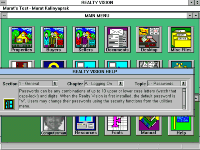
Help screen can be opened from the help submenu as you
start Realty Vision, or at any time from any other screen.
It can be moved around and it floats over all other displays,
remaining open as you proceed from one screen to another.
This allows you to learn while you practice what you learn.
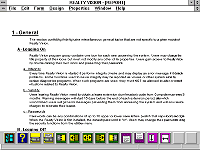
- Help information is arranged in a nested section, chapter, topic structure which makes it easier
to find and follow instructions in a steady flow.
Realty Vision does not come with printed manuals. Instead,
it offers you the capabilities for printing a manual or just the
sections you need, if you need them, as you need them.
Because the help system is structured in section, chapter,
topic order, printed pages look like the pages of a preprinted
manual. You may organize them in a binder or just read on
your monitor, if you prefer it to using the floating help screen.
- The help text displayed on the floating screen can be edited by the users to incorporate their own
notes into the Realty Vision help system.
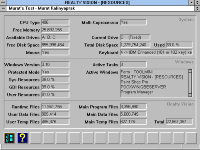
The system information screen analyzes your system and
displays selected data about its current set-up, which may
be used for configuring, fune-tuning or trouble-shooting any
problems with your system.
The MS-Windows related information shows you the active
tasks and the system resources, which may also be used
to fine-tune and trouble-shoot your operating environment.
- Realty Vision related section of the screen shows the disk space occupied by the Realty Vision
program and data files, which may help you with doing more efficient backups, etc.
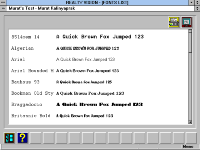
Realty Vision gives you access to all of the fonts installed
on your system. A screen in the help module shows you
all available fonts using a short sample text. You may also
print these font samples in a report that you can use as a
general reference, when using other software also.
Another icon on the help submenu opens a small screen
displaying contact information for obtaining further help.

 Realty Vision does not come with printed manuals. Instead,
 The system information screen analyzes your system and
 Realty Vision gives you access to all of the fonts installed