Realty Vision's select and search functions based on buyer
profiles are very unique and powerful. You may enter criteria
about a specific property and search your prospects file for
buyers who may be interested in that property. Or you may
enter some prospect categorizing and rating criteria to select
a group of buyers (i.e. out-of-state buyers) to work on.
- Property and prospect related criteria may be used separately or combined to be more selective.
- Any set of often used criteria may be named and saved, to be reused later without retyping.
Yet another very powerful function is the cross-matching of
selected prospects with available properties automatically.
When asked, Realty Vision will read profiles of all prospects
or just the selected set of prospects, and for each and every
one of them, will scan the available properties in the listings
database for matches that each prospect may be interested
in, producing a separate set of reports for each prospect.
- All report types available during individual processing are also available during cross-matching.
- Each set of report is of course personalized with the buyer name in the report header.
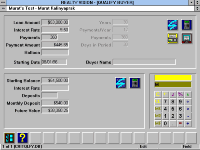
Buyer qualifying utilities screen allows you to perform future
value and present value calculations, including the capability
for calculating balloon payments.
Experimenting with different variables is as easy as changing
a given entry and clicking the recalculate icon.
You can also perform "rent vs buy" comparisons right on the
same screen.
- An on-screen calculator with visible memory is included for additional convenience.
- The system will also do auxiliary calculations, such as the number of months in 27 years, etc.
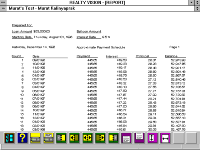
And if you need to print one, producing an amortization
schedule personalized with your customer's name on it,
is just a matter of a mouse-click.


 Yet another very powerful function is the cross-matching of
 Buyer qualifying utilities screen allows you to perform future
 And if you need to print one, producing an amortization