Realty Vision will enable you to produce impressive flyers
literally in just a few minutes.
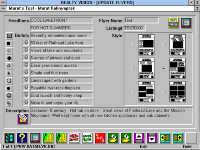
Six built-in templates allow creating flyers with one to four
photos, up to ten bullet-marked items, a short description
and of course, your own photo and company logo. You can
name and save your flyers to reprint copies as you need.
- Ten different built-in bullet-marks help you create flyers that do not look all the same.
- The description can be copied from the property listings file at the click of an icon and may be
edited as needed or you may opt to type a different description altogether.
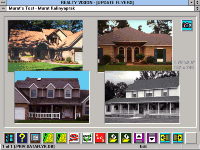
Flyer file records can store up to four property pictures of
unlimited colors. If you own a color printer, Realty Vision
flyers will be printed in full-color with the pictures arranged
as indicated by the template selection icons.
The property pictures used in flyers are stored separately,
thus they don't have to be the same pictures as the ones
used in the property listings database.
- If you opt to use the same pictures as the ones in the property listings database, a click of an
icon is all you will need to copy those pictures into your flyers file.
- Using different pictures is as simple as importing them from image files of many popular formats
or pasting them from the clipboard.
As with all other Realty Vision reports, you may preview your
flyers on your monitor in full-page WYSIWYG format, to see
how they will look when printed.
Optionally you may omit the property pictures. In which case
Realty Vision will only print empty frames where the pictures
would have been printed. You may then clip to size and glue
real photographs to fit within those preprinted frames.

 Flyer file records can store up to four property pictures of
 As with all other Realty Vision reports, you may preview your
