Prospective seller functions allow you to keep information
for preparing CMA's, obtaining new listings and searching
for potential properties for sale, meeting a specific buyer's
criteria, etc. Once you store buyer profiles in your file, you
can redo CMA's and perform other repetitive buyer related
functions anytime by simply recalling the buyer records.
- Preparing and printing a CMA is as easy as entering the listing numbers of three comparable
properties and clicking on an icon. CMA's are explained in detail on the following page.
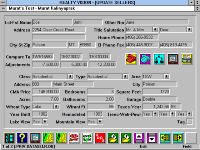
- Name, address, title, salutation, etc. information are used in form-letters and mass-mailings.
- Telephone icons let you dial seller's home and business numbers with just one mouse click.
Seller profiles contain numerous data fields to categorize and
rate your prospects. This feature enables you to later select a
set of prospects based on certain criteria and thus make better
use out of your valuable time.
There are also contact management oriented fields that you
can use to schedule phone calls, meetings, etc. or to send
holiday greetings, birthday cards, etc.
- The comments field allows you to enter and maintain unlimited amounts of formatted text.
- A separate field helps you keep track of referrals to and from you.
Realty Vision's seller select processes performed on prospect
profiles give you very useful and powerful functions to get new
listings and keep your existing ones.
You can use the property data in prospect files to do virtual
searches. Matching interested buyers with "not-yet-listed"
properties may motivate procrastinating potential sellers to
list their properties with you.
- Property and prospect related criteria may be used separately or combined to be more selective.
- Any set of often used criteria may be named and saved, to be reused later without retyping.
In multiple-user installations, each agent's private information
such as prospective buyers, prospective sellers, etc. are kept
segregated and protected by passwords. Critical system files
are also protected by a "priviledged user" password.
A function in the desktop module uses the above mentioned
contact management related fields to produce "to-do lists"
for any given date range. Separate prospective buyer and
prospective seller sections are printed on the same report.

 Seller profiles contain numerous data fields to categorize and
 Realty Vision's seller select processes performed on prospect
 In multiple-user installations, each agent's private information
